Move every VM off VMware - or around what you already run - without moving your data twice.
Migration Center migrates VMware, OpenStack and Hyper-V workloads to Proxmox, agentless and block-level, with thin copy, changed-block tracking, optional compression and optional deduplication. It also handles VMware-to-VMware and OpenStack-to-OpenStack moves, Proxmox-to-Proxmox cluster consolidation, and Hyper-V replication orchestrated through Hyper-V's own native Replica.
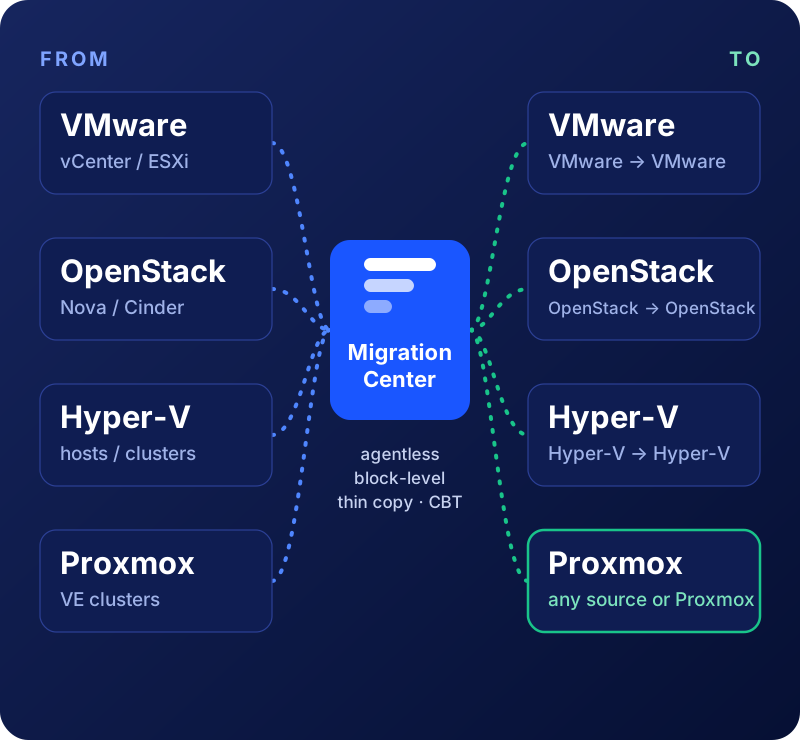
- VMware (vCenter/ESXi) → Proxmox or VMware - migration, plus DR replication to Proxmox
- OpenStack → Proxmox (migration and DR) or OpenStack (migration with continuous sync) - beta
- Proxmox → Proxmox - consolidate or rebalance clusters you already run
- Hyper-V → Proxmox - migration and DR replication with change tracking, repeat syncs and cut-over
- Hyper-V → Hyper-V - orchestrates Hyper-V's own native Replica
What's actually moving, in real time
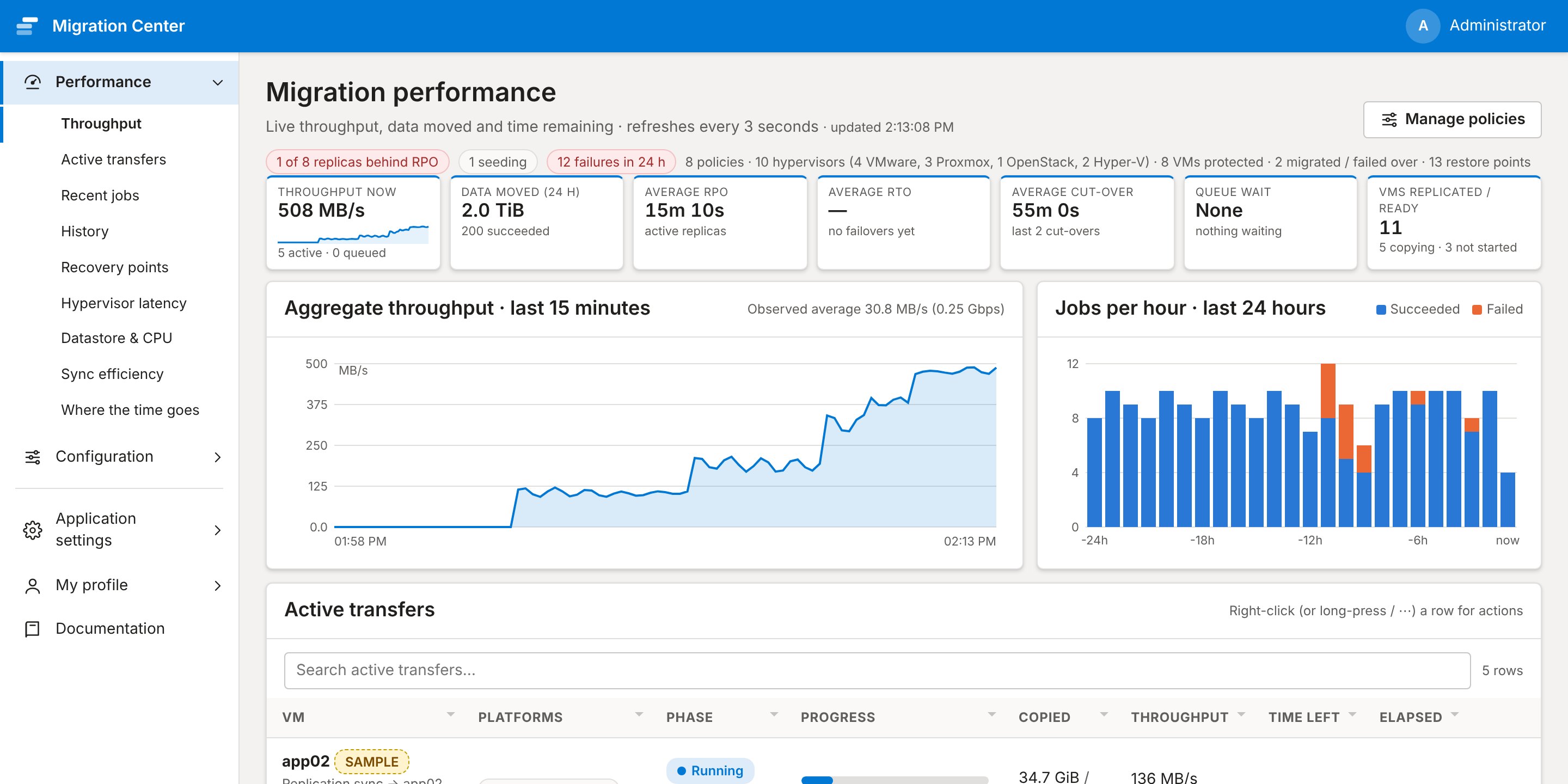
The performance dashboard shows live throughput, jobs per hour, thin-copy, compression and deduplication savings, and job health across every migration in flight - not just a progress bar.
- Policies, hypervisors, VMs protected, and average RPO/RTO, all at a glance
- Active transfers, throughput now, and data moved in the last 24 hours
- History from real time out to 90 days, or any custom range - drag a chart to zoom down to seconds
- Live hypervisor latency in milliseconds, plus datastore and CPU counters, for VMware, Proxmox and Hyper-V
One guided flow, start to cutover
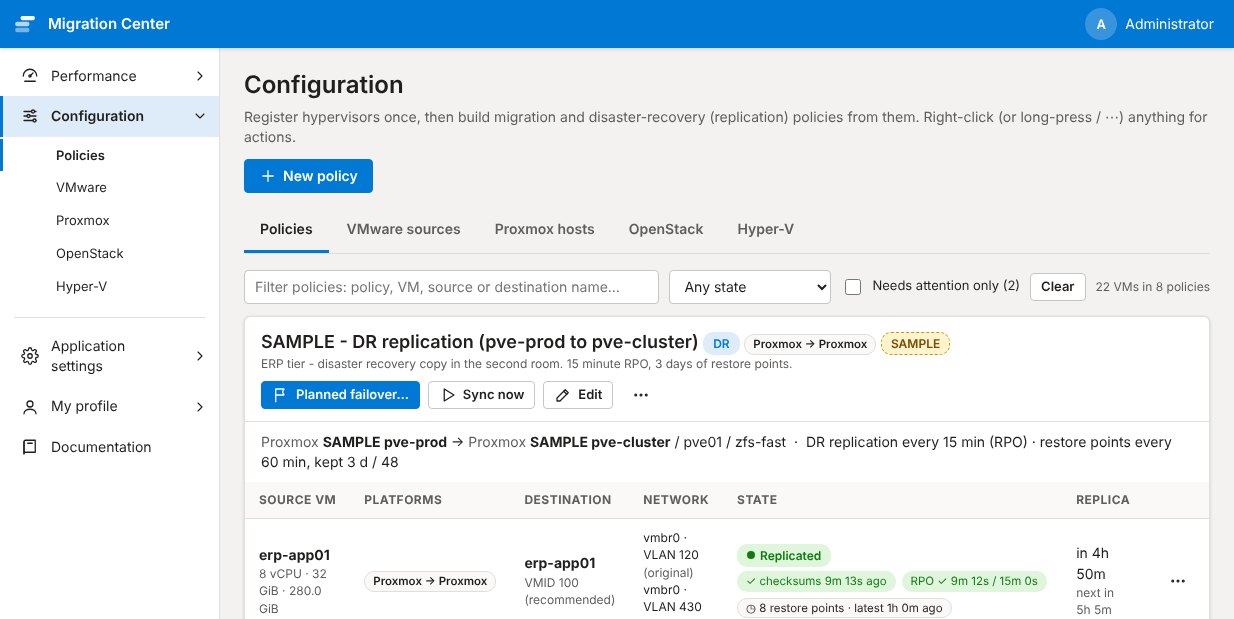
Pick a source, pick a policy, and Migration Center handles the clone, the seed copy, the incremental sync, and the cutover window - with thin copy and changed-block tracking on every pass, and optional compression and deduplication.
- Same wizard for a one-time migration or an ongoing DR replication policy
- Destination disk space checked before a copy starts, with a warning if it won't fit
- Platform-pair shown on every row - vmware→proxmox, openstack→proxmox, and so on
Bandwidth, timing and latency, down to the millisecond
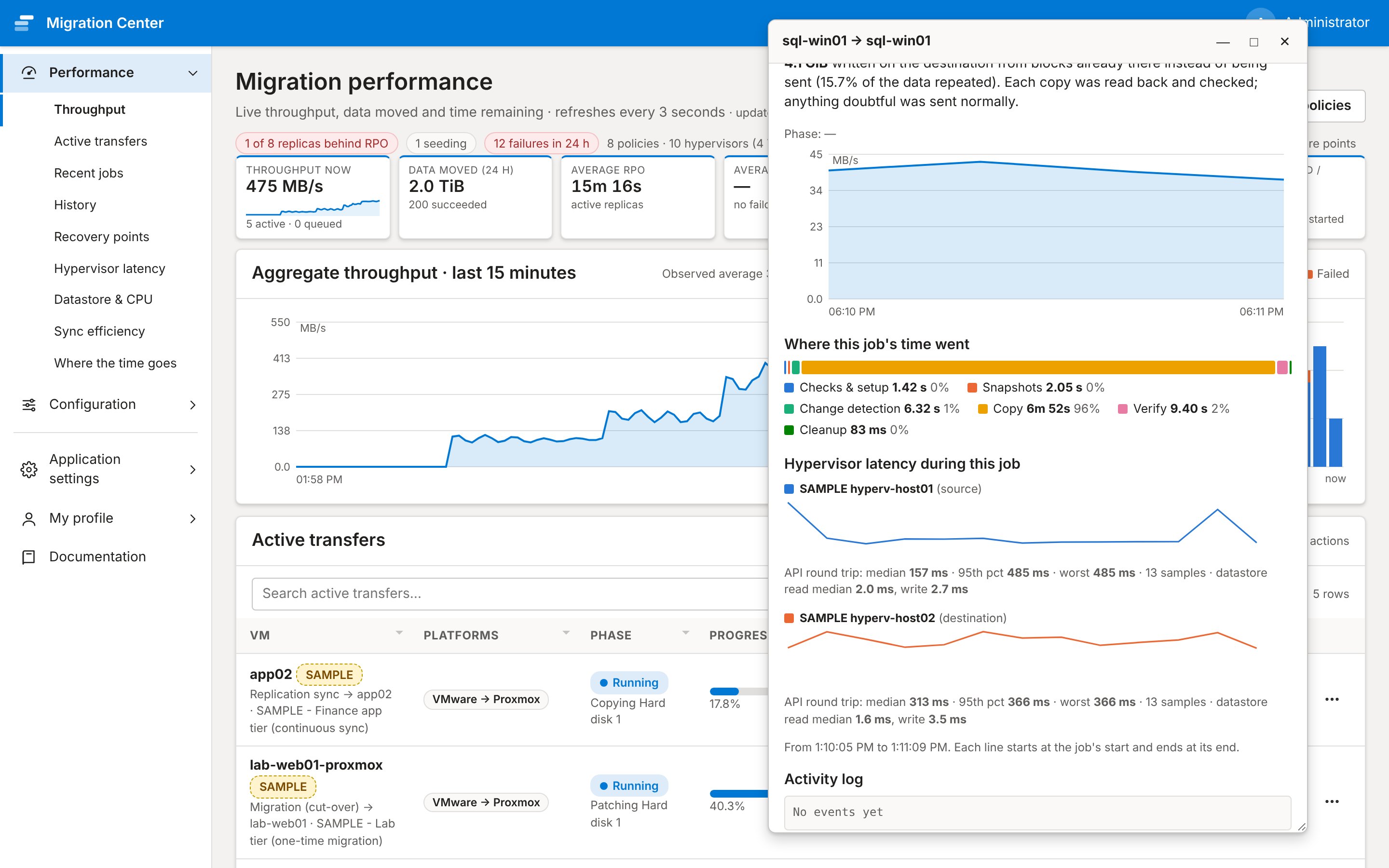
Click any job to see its live transfer rate, how much thin copy, compression and deduplication saved, plus per-phase timings to the millisecond and the latency of the source and destination hypervisor - for troubleshooting a slow window.
- Live throughput, progress, and time remaining for every running job
- Per-job phase breakdown, so a slow run shows exactly where the time went
- Bandwidth limits honored per policy, so migrations don't starve production traffic
Move less data, stay ready for the worst day
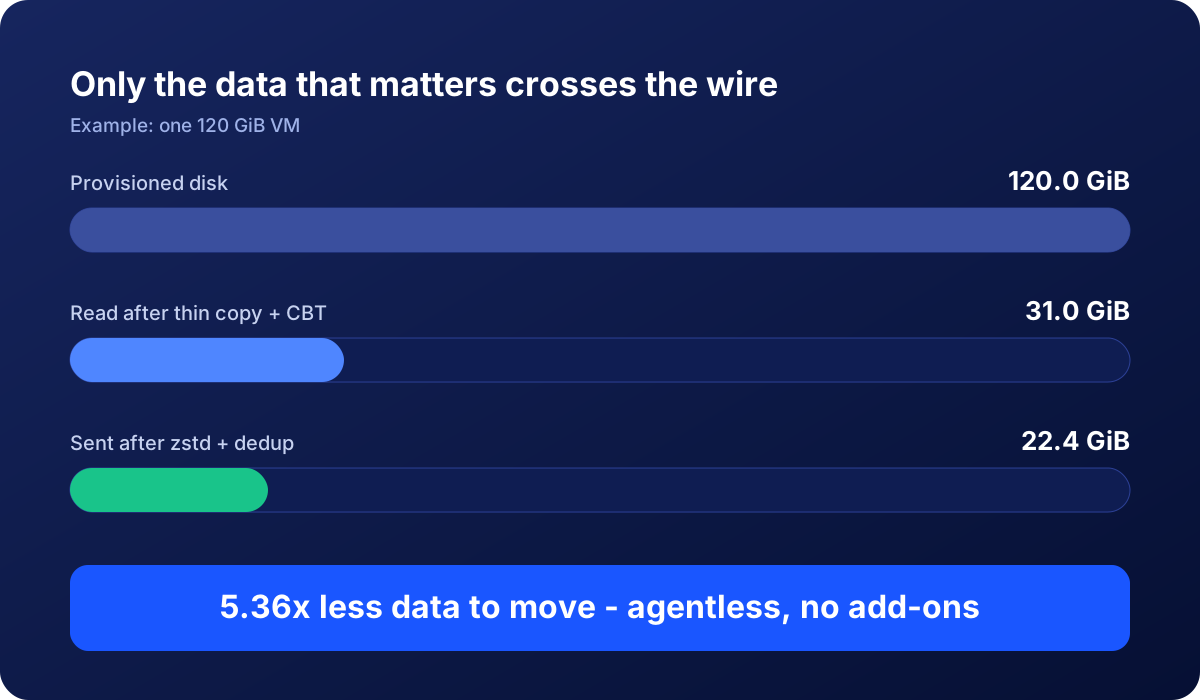
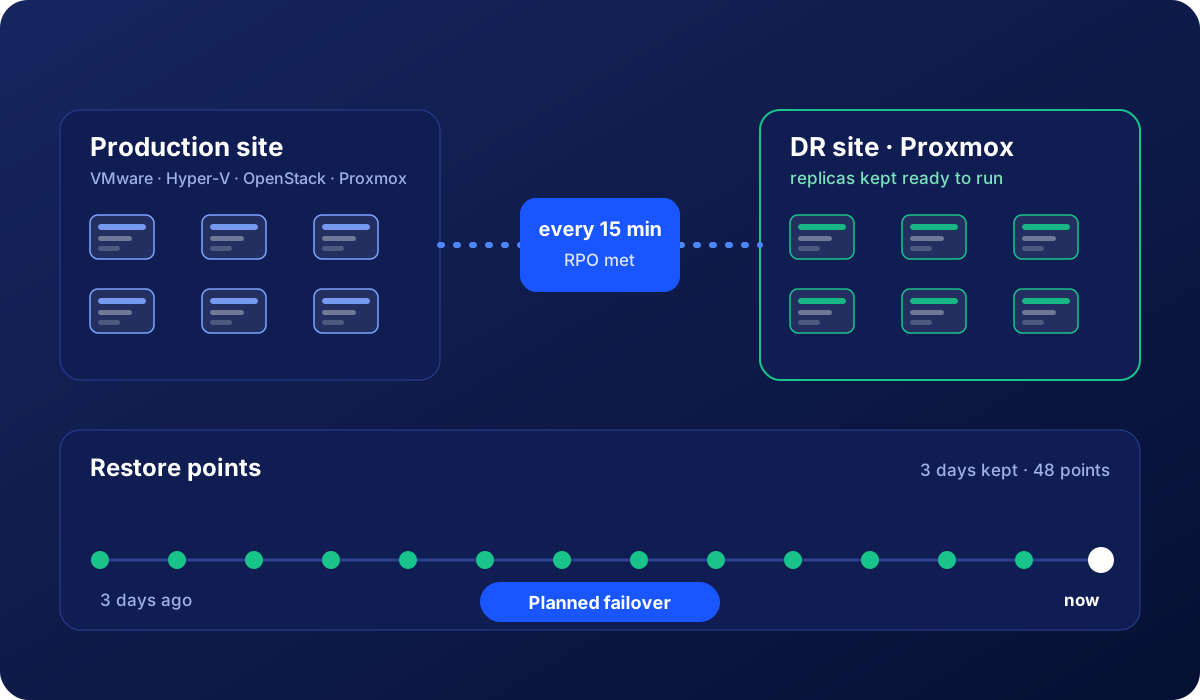
The same engine does both jobs: it copies only what matters to get you there, and keeps a recoverable copy waiting if you ever need it.
Everything an admin needs to control, in one place
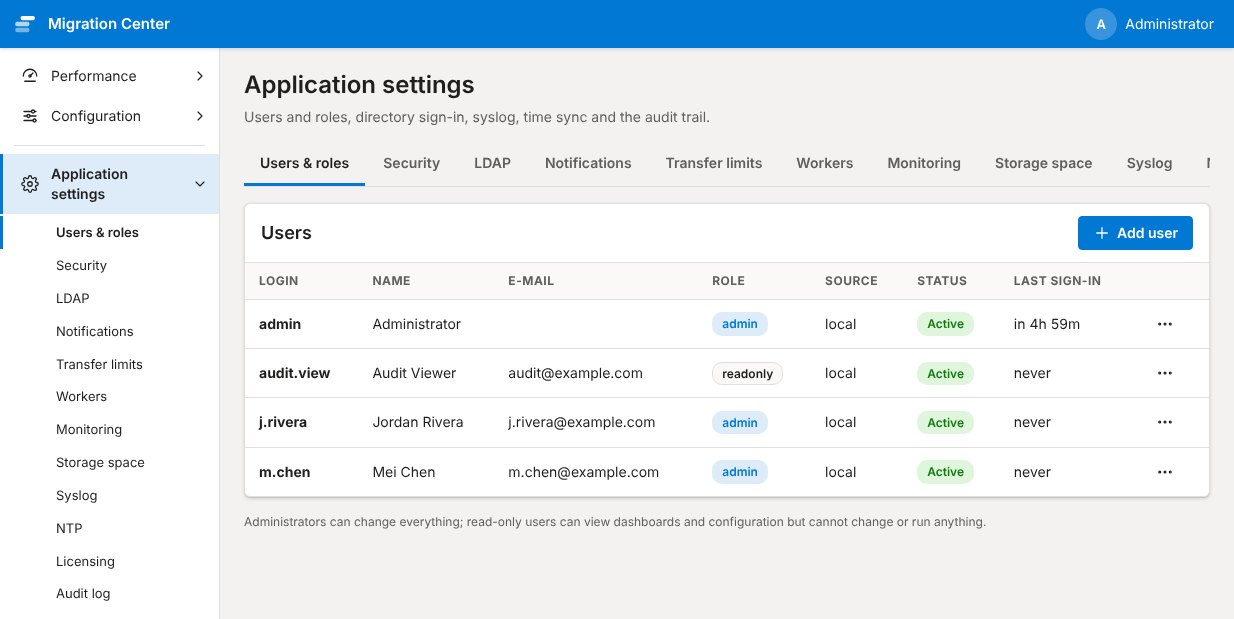
Role-based access, 2FA, audit logging, encrypted credential storage, and per-policy scheduling - without a separate console for each.
- Admin / operator / read-only roles, with two-factor sign-in via any TOTP app
- Full audit log of who changed what, and when
- Hypervisor credentials and SSH keys encrypted at rest with rotatable keys
Thin copy, changed blocks, compression, deduplication
After the first copy only the blocks that changed move, empty blocks are skipped where the destination allows it, optional zstd wire compression shrinks the rest, and optional deduplication copies blocks that are already on the Proxmox node locally instead of sending them again, with every copy verified - all part of the product, not a separate SKU. The live savings are shown right on the dashboard and in each job.
Agentless, block-level
No agent to install or clean up inside the guest. Copy a running VM online from a snapshot while it keeps serving production traffic until you cut over, or shut it down first for the cleanest copy. An optional safety clone keeps a full copy of the original before anything changes.
One tool, two outcomes
License it for a one-time migration, or keep it running as ongoing disaster-recovery replication - same install, same workflow, same dashboard. Mix both: some VMs migrate once, others stay under continuous DR, side by side.
Built for enterprise estates
From a handful of VMs to large, busy environments: the same appliance, with the scheduling, resilience and controls that bigger migrations need.
Fair, predictable scheduling
Cut-overs and failovers always go first, then first copies, then routine syncs. Work is shared fairly between policies, limits protect every source host and destination node, and sync times are spread out so hundreds of VMs never all come due at once.
Scale out, not just up
Add worker capacity with a single command as the estate grows. A queue-wait view and an alert tell you before waits start to threaten your recovery targets - and the documentation includes a sizing guide.
Keeps going when things break
Restarts and upgrades let running jobs finish cleanly. A database outage does not lose results. An interrupted first copy continues where it stopped, and the part already copied is re-checked against the source.
Self-managing storage
Old job history and logs are cleaned up automatically, the appliance warns before its disk fills, and the destination is checked before a copy begins and watched while it runs.
Operations-ready
Health checks for every service, optional metrics for your monitoring system, support for a highly available PostgreSQL, and encrypted off-site copies of the appliance's own backups.
Secure by design
Role-based access, two-factor sign-in, a full audit trail, encrypted credentials and strict separation of tenants and data - the controls security teams ask for, in the box.
Not sure what size to deploy? See the recommended sizing for small, medium, large and enterprise estates.
Ready to move off VMware?
Download it free to try against a real workload, or buy a license for the VM count or DR seats you need.